
A closer look at Adobe Premiere Pro:
Adobe premiere pro is one of the most widely used video editing tools in the media industry. From youtube creators to production houses, professionals rely on it to produce high – quality video content. However, learning software alone is not enough to build a successful editing career.
A professional Adobe Premiere pro course in Patiala focuses on practical workflows, real project experience, and industry – level techniques, this training helps students gain confidence, improve editing skills, and prepare for real – world video editing opportunities.
Why Learn Adobe Premiere Pro for Video Editing?
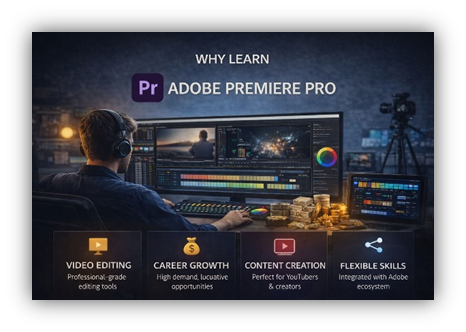
Adobe Premiere Pro is considered an industry-standard video editing software because it is flexible, powerful, and widely accepted across the media industry. Whether it is short-form content like reels and social media videos or long-form projects like advertisements, films, and corporate videos, Premiere Pro is used by professionals worldwide.
Learning Adobe Premiere Pro through structured training helps students understand not just how to edit videos, but how to edit professionally. A dedicated Adobe Premiere Pro course in Patiala trains students to follow proper editing workflows, manage projects efficiently, and deliver high-quality output that meets industry expectations.
Key Reasons to Learn Adobe Premiere Pro:
•Used by professional editors in studios and agencies
•Suitable for YouTube, reels, ads, events, and corporate videos
•Supports high-quality video formats and timelines
•Integrates smoothly with After Effects and Photoshop
•Ideal for beginners as well as advanced editors
What You Will Learn in an Adobe Premiere Pro Course in Patiala
A professional Adobe Premiere Pro course in Patiala is designed to take students from basic editing concepts to advanced professional workflows. The training focuses on practical learning so that students can confidently work on real editing projects.
Core Topics Covered in Training:
• Understanding the Interface & Workspace:
Learn how to navigate the Adobe Premiere Pro interface, customize workspaces, and manage panels efficiently for faster editing.
• Importing & Organising Media:
Understand how to import video, audio, and image files and organise them properly for smooth project management.
• Timeline-Based Video Editing:
Learn professional cutting, trimming, and sequencing techniques to create smooth and engaging videos.
• Transitions & Visual Effects:
Apply transitions and basic effects to enhance video flow and improve visual quality without overusing effects.
• Audio Editing & Sound Enhancement:
Learn how to sync audio, remove noise, adjust levels, and improve overall sound quality.
• Colour Correction & Basic Colour Grading:
Understand how to balance colours and apply cinematic looks to improve the overall visual appeal of videos.
• Text, Titles & Motion Graphics Basics:
Create clean titles, lower-thirds, and basic motion graphics for professional-looking videos.
• Exporting & Rendering Videos:
Learn how to export videos in different formats and resolutions for YouTube, social media, ads, and high-quality output.
Practical Training & Live Project Experience
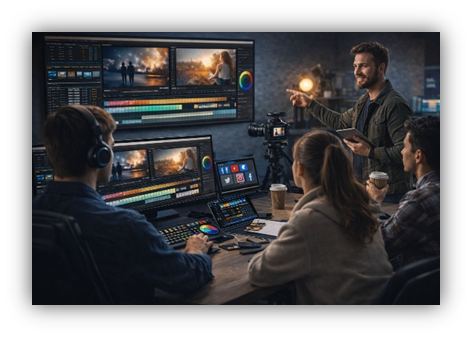
A professional Adobe Premiere Pro course in Patiala focuses heavily on hands-on practice. Students are trained through real-style editing tasks instead of only watching demos. This approach helps learners understand how professional editors actually work in studios and agencies.
Practical Training Includes:
- Editing YouTube videos and short-form content
- Creating Instagram reels and social media edits
- Working on promotional and advertisement-style videos
- Handling raw footage and project files
- Understanding revisions and client feedback
- Managing deadlines and project delivery
This practical exposure helps students build confidence and improve editing speed and accuracy.
Skills You Will Develop with Adobe Premiere Pro Training
Along with software knowledge, students develop essential creative and technical skills that are required in real jobs.
Key Skills Developed:
- Professional video editing workflow
- Timeline and project management
- Visual storytelling and pacing
- Audio and video synchronization
- Colour balance and visual consistency
- Attention to detail and quality control
These skills help students handle different types of editing work efficiently and professionally.
Freelancing Opportunities with Adobe Premiere Pro
Adobe Premiere Pro is widely used by freelance video editors across the world. Many professionals work independently and manage multiple clients at the same time.
During training, students learn:
- How to communicate with clients professionally
- How to understand project requirements
- Basic pricing and time estimation
- Managing multiple projects smoothly
- Building long-term client relationships
With experience and a strong portfolio, freelancing can become a flexible and rewarding career option.
Career Opportunities After Learning Adobe Premiere Pro
Adobe Premiere Pro skills are in high demand across the media and digital industry. After completing the course, students can apply for various creative roles based on their interest and experience.
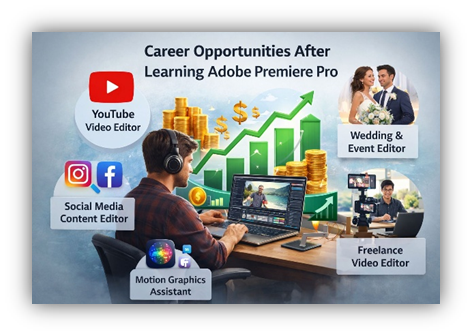
Popular Career Options:
- Video Editor
- YouTube Video Editor
- Social Media Content Editor
- Wedding & Event Video Editor
- Freelance Video Editor
- Motion Graphics Assistant
Professionals trained in Adobe Premiere Pro are hired by production houses, digital marketing agencies, media companies, event firms, and online creators.
Who Should Join an Adobe Premiere Pro Course in Patiala?
This course is suitable for:
- Beginners interested in video editing
- Students learning professional editing skills
- YouTubers and content creators
- Freelancers
- Social media managers
No prior editing experience is required — beginners can start learning from the basics with proper guidance.
Why Choose CIT Patiala for Adobe Premiere Pro Training?
CIT Patiala provides structured and career-focused training designed to help students grow professionally.
Why CIT Patiala
- Practical, project-based training
- Experienced and supportive trainers
- Small batch size for personal attention
- Portfolio-building guidance
- Career and freelancing support
The focus is not just on teaching software but on preparing students for real industry work.
Certification & Industry Recognition
After completing the Adobe Premiere Pro course in Patiala, students receive a professional certification that validates their video editing skills and training. This certification acts as proof of practical knowledge and helps students stand out while applying for jobs, internships, or freelance projects.
The certification highlights the student’s understanding of professional editing workflows, industry-standard tools, and real project experience. It also strengthens resumes and portfolios, making them more credible in front of employers and clients.
       Benefits of Certification:
       • Adds professional value to resumes and portfolios
       • Helps during job interviews and internship applications
       • Builds trust with freelance clients
       • Demonstrates hands-on training and practical expertise
       • Supports long-term career growth in video editing


This certification reflects the quality of training and practical exposure provided by CIT Patiala.
Conclusion
Learning Adobe Premiere Pro is an important step for anyone planning a career in video editing. A professional Adobe Premiere Pro course in Patiala provides the right balance of technical skills, practical exposure, and career guidance. With consistent practice and proper training, students can confidently enter the video editing industry and build a successful creative career.
Frequenty Asked Questions (FAQ)
Q1. What is Adobe Premiere Pro and why is it important for video editing?
Adobe Premiere Pro is a professional video editing software widely used in the media industry. It is used for editing YouTube videos, reels, advertisements, films, wedding videos, and corporate content. Learning Adobe Premiere Pro helps students work on real industry-level projects and build a strong video editing career.
Q2. Do I need any prior experience to join the Adobe Premiere Pro course in Patiala?
No, prior experience is not required. The Adobe Premiere Pro course in Patiala at CIT is designed for beginners as well as learners who want to improve their professional editing skills. Training starts from basics and gradually moves to advanced workflows.
Q3. What will I learn in the Adobe Premiere Pro course?
In this course, students learn professional video editing techniques including timeline editing, transitions, colour correction, audio editing, titles, exporting formats, and real project workflows. The training focuses on practical learning and real-world editing tasks.
Q4. Is this course suitable for YouTubers and content creators?
Yes, this course is ideal for YouTubers, Instagram creators, and social media managers. Students learn how to edit reels, short-form videos, YouTube content, ads, and promotional videos using professional editing standards.
Q5. Will I get practical training and live project experience?
Yes. The Adobe Premiere Pro course in Patiala at CIT includes hands-on practical training and live-style projects. Students work on YouTube videos, reels, promotional content, and real editing tasks to gain confidence and industry experience.
Q6. Does the course help with freelancing skills?
Yes. Along with editing skills, students learn basic freelancing concepts such as client communication, project handling, revisions, time management, and portfolio building. This helps students start freelance video editing work confidently.
Q7. What career options are available after learning Adobe Premiere Pro?
After completing the course, students can work as Video Editors, YouTube Editors, Social Media Editors, Wedding & Event Editors, Motion Graphics Assistants, or Freelance Video Editors. Adobe Premiere Pro skills are in high demand across the media industry.
Q8. Will I receive a certificate after completing the course?
Yes. After successfully completing the Adobe Premiere Pro course in Patiala, students receive a professional certification from CIT Patiala. This certificate validates practical training, software skills, and real project experience.
Q9. How does certification help in career growth?
The certification strengthens resumes and portfolios, helps during job interviews, internship applications, and builds trust with freelance clients. It proves that the student has hands-on training and professional editing knowledge.
Q10. Why should I choose CIT Patiala for Adobe Premiere Pro training?
CIT Patiala offers structured, practical, and career-focused training with experienced trainers, small batch sizes, real project exposure, portfolio guidance, and career support. The goal is to prepare students for real industry work, not just software knowledge.
Q11. Can I work while learning Adobe Premiere Pro?
Yes. Many students manage studies, jobs, or freelancing alongside the course. Proper training helps students learn workflow management and handle editing projects efficiently without overload.
Q12. How can I enroll in the Adobe Premiere Pro course in Patiala?
You can contact CIT Patiala directly for course details, batch availability, fees, and enrollment guidance. The team will help you choose the right training plan based on your goals.
Contact Us:
Interested in learning professional ADOBE PREMIERE PRO , get in touch with CIT PATIALA to know more about course details, fees, and upcoming batch schedules.
CIT PATIALA – COMPUTER INSTITUE & TRAINING CENTER
ADDRESS: SCO 46, 1st Floor, Leela Bhawan, Patiala, 147001 Punjab
PHONE: +91 98147-17796 +91 75278-61800
EMAIL: info@creativeitechnologies.in
WORKING HOURS:
MONDAY – FRIDAY | 9:00 AM – 6:00 PM